Cloud Storage Subscription Creep Across Apple, Google, and Microsoft
Companies engineer free tiers too small to last, then nudge users toward expensive upgrades.

Cloud storage subscriptions from Apple, Google, and Microsoft aren't priced by accident. The tiers, the free-trial defaults, the shared family pools: all of it is built to make the next upgrade feel like the only reasonable move, not a choice you actually made. Most people set up their storage plan once, during a moment of panic when their phone said "storage full," and never look at it again. That's the default behavior these platforms are counting on.
Start with the free tier. Apple has offered 5GB of free iCloud storage since 2011. Fifteen years later, iPhone photos and 4K video files have ballooned in size, but that 5GB hasn't moved an inch. It's not an oversight. A free tier that can't hold a year of photos is a free tier doing exactly what it's supposed to do: expire fast and hand you a bill.
How Apple's iCloud+ pricing structure pushes upgrades
iCloud+ runs five paid tiers: $0.99/month for 50GB, $2.99/month for 200GB, $9.99/month for 2TB, $29.99/month for 6TB, and $59.99/month for 12TB. Every single one is billed monthly. There's no annual option anywhere in the lineup, which is unusual among the three platforms covered here.
Look at the per-gigabyte math and the pricing ladder starts to make sense as a nudge, not a menu. The 50GB tier costs roughly four times as much per gigabyte as the 2TB tier. Apple is upfront about this. It's just betting that once someone's paying for storage at all, jumping two or three tiers up looks like a rounding error rather than a real spending decision.
The lack of annual billing costs users real money over time. Google One and Microsoft's OneDrive both offer meaningful annual discounts for committing to a year upfront. Apple offers nothing. Stretch that gap out over five years on the 2TB plan, and it adds up to a meaningful amount of money left on the table, just for paying monthly because that's the only button on the screen.
Family Sharing adds another wrinkle. iCloud+ storage isn't divided per person, it's one shared pool. So if one family member backs up a phone full of 4K video and burns through most of a 200GB plan, the whole family gets pushed up to the $9.99/month 2TB tier, whether the other three people on the plan use 2GB or 200GB. The upgrade decision gets made for the family by whoever has the heaviest camera roll.
How Google One repackaged storage as an AI bundle
Google One prices its storage at $1.99/month for 100GB, $2.99/month for 200GB, and $9.99/month for 2TB. At the 200GB tier, Google's price matches Apple's exactly, dollar for dollar. That's not a coincidence so much as a sign both companies have landed on the same number as the "serious but not scary" price point.
What changed in 2026 is what's inside the box. Google merged its AI features into the storage tiers, so plans at 2TB and above aren't sold as plain storage anymore, they're sold as AI bundles. You're not just buying gigabytes at that level, you're buying access to Google's AI tools bundled in, whether that's the reason you signed up or not.
On annual billing, the 2TB plan runs out to about $4.17 per terabyte per month. Google also ran a promotional rate in early 2026, $49.99 for the first year on that same tier, a price that resets once the promotional period ends. Anyone who signed up during that window and forgot to check the renewal price is in for a jump they didn't plan for.
The pressure point on Google's side isn't a family pool but a shared quota. The free 15GB tier is split across Drive, Gmail, and Google Photos, all pulling from the same bucket. A few years of email attachments can eat into that quota just as fast as photo backups do, which means plenty of people upgrade thinking they need more photo storage when the real culprit is a Gmail inbox nobody's cleaned out.
How Microsoft 365 turns a productivity subscription into an invisible storage upgrade
Microsoft doesn't really sell OneDrive storage on its own at a competitive price. Instead, storage rides along inside a Microsoft 365 subscription. Personal runs $6.99/month and includes 1TB of storage plus the full suite of office apps, the works. Family runs $9.99/month, covers up to six people, and gives each person their own 1TB, not a shared pool like Apple's setup.
Here's where the math gets interesting. Someone already paying $69.99 a year for Microsoft 365 Personal is effectively paying about $5.83 a month for full Office access plus 1TB of cloud storage. Paying separately for Office software and a standalone cloud storage plan on top of that is close to guaranteed overspending. The bundle is genuinely the better deal here, which makes it the rare case in this space where the "upsell" and the "smart choice" happen to be the same product.
Two announcements matter for anyone on Microsoft's plans right now. Microsoft said it was scrapping some OneDrive plans. Separately, back in December 2025, Microsoft announced price increases taking effect in July 2026, ranging from 5 percent to 43 percent depending on the plan. Officially, the increases are framed as reflecting more investment in security, AI, and device management.
That creates a timing trap for anyone eyeing an annual plan. Annual billing saves a meaningful amount compared to paying monthly, which sounds like a clear win. But locking in an annual plan right as the July 2026 increase lands means paying the new, higher rate for a full 12 months straight. Checking the live rate at checkout, not the rate you remember from six months ago, matters more here than it does on Apple or Google's monthly-only setups.
The mechanics that all three platforms share: free-trial conversion, price-increase notices, and the difficulty of canceling
All three platforms lean on the same three levers: trials that convert without a reminder, price hikes that get announced but rarely land in a way people notice, and cancellation flows that take more effort than signing up ever did.
Free trials are built to be forgettable. They require a card up front, auto-renew comes pre-checked, and the end date lives somewhere nobody's going to think to look again. Surveys on subscription habits have found that a large share of people admit they've forgotten to cancel a trial before it converted to a paid plan. That's not a fluke of memory but the trial working as designed.
Microsoft is at least direct about how its OneDrive trial behaves: according to Microsoft's own support documentation, once the one-month free trial ends, the subscription automatically converts and the applicable fee gets charged, full stop. Canceling during the trial window is the only way to avoid the charge.
Canceling itself makes the asymmetry most visible. Signing up takes a couple of taps. Getting out takes navigating a flow built by three different companies with three different sets of friction:
iCloud+: tapping Cancel Subscription sounds simple, except if there's an Apple One subscription attached, that has to be cancelled first before iCloud storage can be downgraded at all, as Apple's own support pages explain. Google One: cancelling stops the auto-renewal, but past purchases are non-refundable, and switching phones from iPhone to Android locks billing to the original payment method, as Google's help documentation explains. Microsoft 365: there's a 7-day window for a prorated refund after a paid subscription kicks in, and a refund window on initial purchases of up to 30 days or before the first recurring billing date, whichever comes sooner, as Microsoft's support pages explain.
Price-increase notices are technically sent, but the gap between announcement and charge does a lot of work to make sure nobody connects the two. Microsoft announced its July 2026 increase months in advance, leaving a substantial gap between the notice and the charge. The higher charge appears on a statement only after the email that warned about it is long buried.
Reading your actual storage usage before deciding whether to upgrade or downgrade
Before touching any upgrade button, check what's actually being used. Many people's actual usage falls well within what the cheapest paid tiers on any of these platforms, the $0.99 to $2.99 range, cover without issue.
On iCloud, the path is Settings, then your name, then iCloud, then Manage Account Storage. That screen breaks usage down by app and by device backup, so it's possible to see exactly what's eating space instead of guessing.
Google One shows the same kind of breakdown in its storage management interface, split out by Drive, Gmail, and Photos. Email attachments can stack up just as fast as photo libraries, and are easy to overlook when diagnosing what's pushing usage toward the next tier.
OneDrive users can check their storage management settings for a similar look at current usage and what's driving it.
None of this takes more than a couple of minutes. And yet skipping it is exactly how people end up paying for 2TB when they're using 80GB.
What the market outside Apple, Google, and Microsoft offers, and when switching is worth considering
There's a wider market of cloud storage providers, and several of them undercut Apple, Google, and Microsoft on raw price per terabyte by a wide margin.
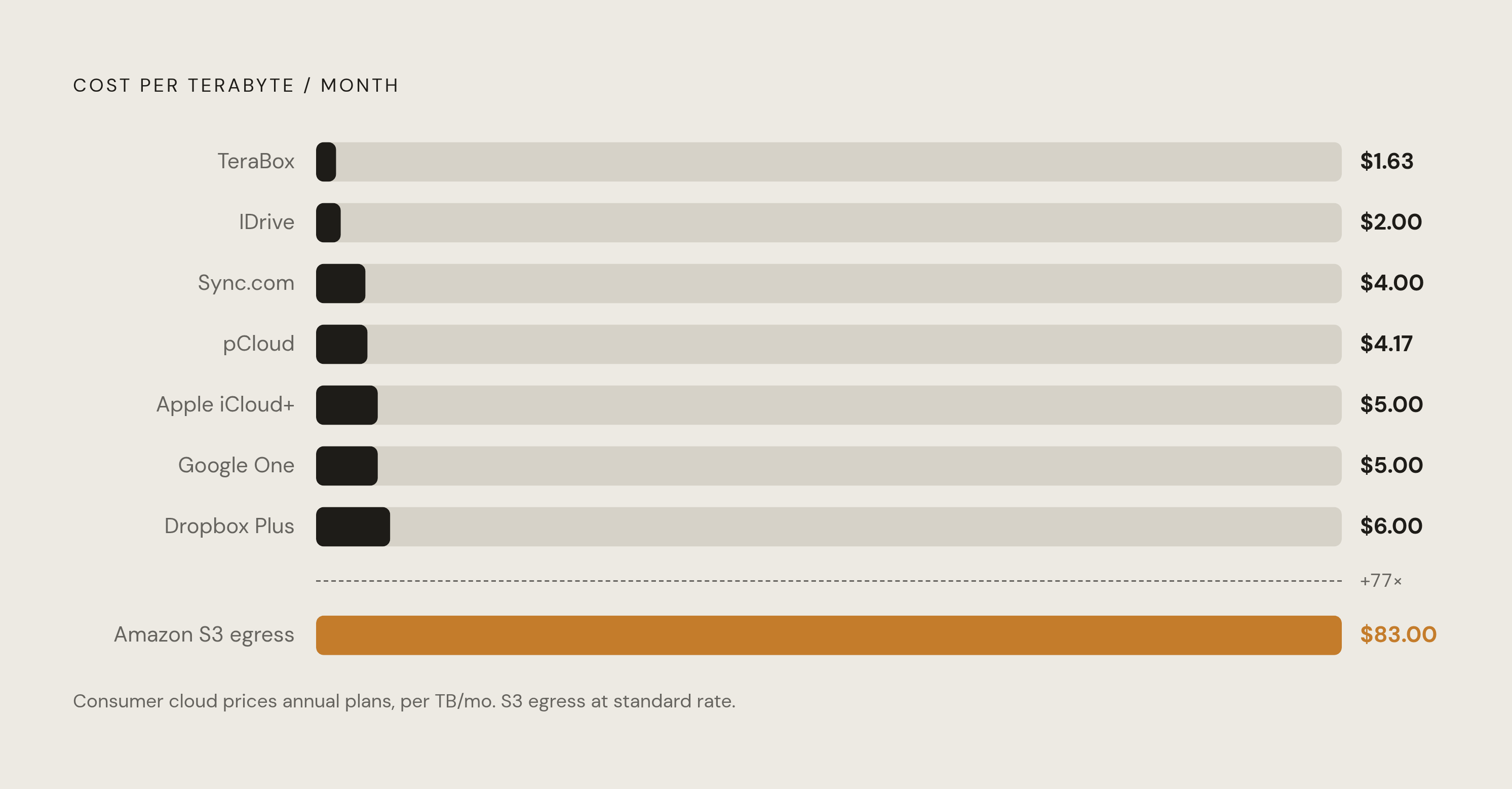
TeraBox charges roughly $1.63 per terabyte per month on its 2TB Premium annual plan, making it the cheapest paid option in this comparison. Its free tier offers 1TB, though it's ad-supported and speed-capped. IDrive runs $2.00 per terabyte per month, but it's built for backup, not as a general sync drive, so the use case is narrower. Sync.com charges $8 a month for 2TB and builds in end-to-end, zero-knowledge encryption by default, which makes it a strong fit for sensitive documents specifically. pCloud runs $4.17 per terabyte per month on annual billing, or offers a one-time lifetime payment of $199 for 2TB, a deal that breaks even against monthly plans somewhere around 18 to 24 months in. MEGA offers 20GB free, the largest no-strings free tier among the group, with end-to-end encryption included. Dropbox Plus, at $11.99 a month for 2TB, costs more than the equivalent Google or Apple plans; its selective sync and file conflict handling are genuinely strong, but that premium is hard to justify if all someone needs is backup.
None of the consumer platforms, iCloud, Google One, or OneDrive, charge egress fees for pulling your own data back out. That's a real advantage over enterprise cloud platforms, where moving a single terabyte out of something like Amazon S3 can run about $83 in fees alone.
Switching makes sense for people who aren't locked into a particular ecosystem, don't depend on Office apps day to day, and mainly just need bulk storage space. At scale, the gap between Apple's roughly $5.00 per terabyte and TeraBox's $1.63 per terabyte is real money.
Switching stops making sense the deeper someone's wired into Apple Photos, Google Workspace, or Microsoft 365. The friction of migrating years of files, plus the features left behind, tends to outweigh the savings, especially at the 200GB tier, where all three mainstream platforms already price within a dollar of each other.
Why cloud storage subscriptions require ongoing surveillance, not a one-time audit
These platforms don't hold still. Microsoft raised prices for July 2026. Google repackaged its tiers around AI in 2026. Apple added a 6TB tier as recently as late 2024. The pricing and packaging shift faster than most people's habit of reviewing subscriptions once a year, which means an audit done in January can already be outdated by summer.
People routinely underestimate what they spend on subscriptions each month, and cloud storage isn't the loudest line item driving that gap, but it's one of the quieter, steadier ones: small enough to ignore month to month, persistent enough to add up over years.
Checking usage once and calling it done misses the point. These plans change shape underneath the subscriber. Revisiting the numbers every few months, not once a year, is the only way to actually know whether the tier being paid for still matches the storage being used.